Acramatic
Amada
Anilam
Bosch
Boss
DeltaDynaPath
Fagor
Fanuc
. . . Fanuc Oi
. . . Fanuc OM
. . . Fanuc OP
. . . Fanuc OT
. . . Fanuc 6
. . . Fanuc 10
. . . Fanuc 11
. . . Fanuc 12
. . . Fanuc 15
. . . Fanuc 16
. . . Fanuc 18
. . . Fanuc 21i
. . . Fanuc 21
Heidenhain
Hinumerik
Hitachi
Mazak
Mitsubishi
Okuma
Sinumerik
Traub
Yasnac
| Parameter |
Value |
Comments |
| |
| 0000 |
00000010 |
| 0020 |
0 |
| 0100 |
00100000 |
| 0101 |
10000001 |
| 0102 |
0 |
| 0103 |
9 (BaudRate 2400) |
| |
6 = 300 |
| |
7 = 600 |
| |
8 = 1200 |
| |
9 = 2400 |
| |
10 = 4800 |
| |
11 = 9600 |
| TV Check |
0 = Disabled |
| Punch Code |
1 = ISO |
| Tape Format |
0 |
| I/O Channel |
0 |
Drip Feed. Select Auto/DNC mode
on the control. Press Cycle Start.
Then go to the computer, prepare the
program and click 'Send'. As data
Begins to flow the machine moves. |
| |
In EasyDNC set Baud Rate, Parity,
DataBits and StopBits as above.
Set 'Mode=Auto or Fanuc' |
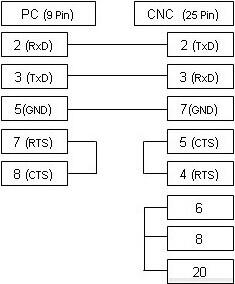
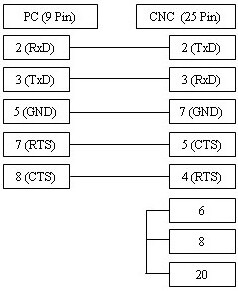
Das oben abgebildete Kabel ist die am häufigsten verwendete Variante und unterstützt die xOn/xOff-Steuerung (DC1/DC3). Falls Ihre CNC-Maschine für die RTS/CTS-Flusssteuerung (Hardware) konfiguriert ist, beachten Sie bitte das untenstehende alternative Anschlussdiagramm, das in den meisten Fällen beide Arten der Steuerung unterstützt.
|